How to Track Inventory Across Multiple Store Locations
A practical account of how a business in expansion managed inventory across multiple store locations, the difficulties caused by maintaining separate records, and the insights I gained on organizing inventory data effectively.

Table of Contents
- What I saw
- The problem starts when every store keeps its own version
- Your stores need to share the same reality
- This is where stock transfers become important
- Then we had another problem: recording the same thing twice
- But a shared inventory number isn’t enough
- And you still need to check the shelves
- So how should you track inventory across multiple locations?
- You don’t necessarily need to buy inventory software
- That’s what I would do before choosing a solution
Table of Contents
How to Track Inventory Across Multiple Store Locations
The easiest way to know whether your inventory process is starting to become a problem is when simple questions become difficult to answer:
“Do we have this in stock?”
And nobody can answer immediately.
Someone has to check a spreadsheet. Or call another branch. Then check the POS and maybe also verify by taking a peek at the shelf only to answer that simple question. And this is when things are still in order.
When tracking is really messed up, you’d have three different answers for that simple question.
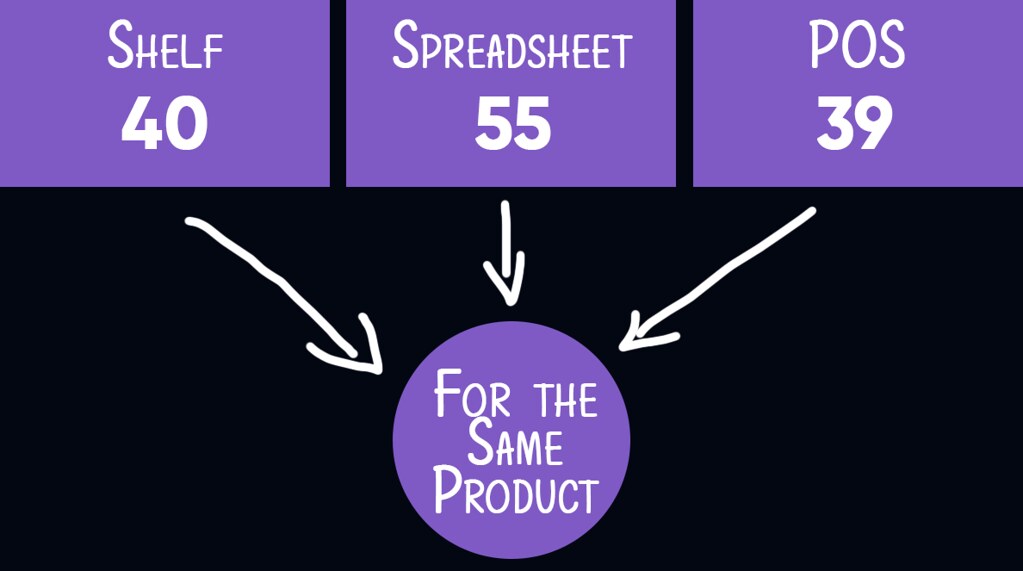
This can happen when a business grows from one store to multiple locations but still needs to know what’s going on collectively.
The inventory itself hasn’t necessarily become difficult.
Information about the inventory has.
What I saw
I saw this with a steel products retailer that had grown to four branches in the same city.
They were already recording their inventory. They had spreadsheets. They had a POS system. And each branch had a manager who’d make reports periodically about this information to the owner.
They had tonnes of data, literally. They sold in-store and online.
If a customer online wanted a particular product, they needed to know which location had it.
Not easy if each location’s data is independent of other locations.
That is the first thing I would change if you’re trying to track inventory across multiple store locations:
Have one shared inventory picture, but make the location of every item part of that picture.
Not:
Product A — 120 units
But:
Product A
Store 1 — 40
Store 2 — 15
Store 3 — 35
Warehouse — 30
Now you can answer two different questions.
How much do we have?
120 units.
Where is it?
40 here, 15 at store 2, 35 at store 3 and 30 in the warehouse.
Simple. But getting to that simple view takes a bit of work.
The problem starts when every store keeps its own version
The steel retailer I was working with had spreadsheets for the different branches. That was a pretty natural thing to do. If you open another store, you give that store another spreadsheet.
Now Store 1 has its inventory.
Store 2 has its inventory.
Store 3 has its inventory.
The problem isn’t really the spreadsheets. It’s that you now have multiple places where the same overall business inventory is being described.
Eventually those descriptions stop agreeing.
A sale can happen at Store 1 and get recorded in the POS, but the spreadsheet isn’t updated.
Stock can move from Store 1 to Store 2, but the transfer isn’t recorded immediately.
Someone can correct a number in one place without that change appearing somewhere else.
Now someone asks:
“How many do we have?”
And the answer depends on which record you looked at.
This is when inventory tracking starts becoming less about counting stock and more about keeping different records in agreement. That’s a very different problem.
Your stores need to share the same reality
This is very easy to miss, especially when things start off small and not so messy.
When you have multiple locations, you don’t really want four separate inventory systems.
You want one inventory system that knows about four locations.
Each location still needs to see its own stock.
But the business needs to be able to see the whole picture.
That means a stock record should carry information about its location.
It should also know what happened to that stock.
A product was received at Store 1.
A customer bought some.
Ten units were transferred to Store 2.
Store 2 received them.
Some were sold.
You see, the inventory number isn’t just a number anymore.
It’s the result of a series of movements.
Once you start thinking about inventory this way, tracking inventory across multiple locations becomes much easier to reason about.
You aren’t maintaining four independent lists. You are tracking one flow of inventory through different locations.
This is where stock transfers become important
Let’s say Store 1 has 50 units of something.
Store 2 has none. You move 20 units from Store 1 to Store 2.
What should your inventory say while those 20 units are being moved?
If you simply change the spreadsheet later, there is a period where the records don’t reflect reality.
Store 1 has already lost the stock.
Store 2 hasn’t actually received it yet.
A proper process for tracking inventory across multiple stores should treat that as a movement:

That way, you can tell what happened to the stock instead of just changing numbers until they look right.
This becomes increasingly important when branches regularly move products between each other.
Otherwise, the same stock can seem to disappear from one location and mysteriously appear at another.
Then we had another problem: recording the same thing twice
The business already had a POS system. That POS knew when something was sold.
But inventory information was also being maintained separately.
This creates a very common problem.
Someone sells something. The POS records it.
Then another record needs to be updated. If that second update doesn’t happen, you now have two versions of what happened.
I don’t like blaming people for “not keeping the spreadsheet updated.” But it happens.
People forget things. People get busy. People assume somebody else has done it.
If the process requires the same information to be entered in two places, eventually there will be differences.
So part of the solution was integrating the inventory system with the existing POS.
The point wasn’t to replace everything. It was to make the systems share information instead of making people repeatedly copy it.
What information are we already recording somewhere else?
If your POS already knows about a sale, your inventory system should ideally know about that sale too.
But a shared inventory number isn’t enough
Another problem. Different people don’t necessarily need the same information.
The owner might want to know the inventory position across all four branches.
A branch manager might only care about their location.
Someone in sales might want to know where a product can be found so they can fulfil an order.
Procurement might want to know which locations are running low.
Finance may be interested in the value of the inventory.
They are all looking at the same business.
They just need different views of it.
The phrase “single source of truth” can be slightly misleading here.
You don’t necessarily want everyone looking at the same screen. You want everyone working from the same underlying information. The truth is one database, but information can then be presented differently depending on what someone needs to do.
And you still need to check the shelves
There is one thing software can’t fix by itself.
If your system says Store 2 has 35 units but there are actually 29 on the shelf, the system is wrong.
So even with a proper system for tracking inventory across multiple store locations, you still need a process for checking your recorded stock against physical stock.
It might be a full stock count.
It might be cycle counting.
It might be investigating unusual differences.
The exact process depends on your specific business.
The important thing is that you don’t assume:
“The software says 35, therefore we have 35.”
The software can tell you what should be there. Your physical stock tells you what is actually there.
You need both.
So how should you track inventory across multiple locations?
If I had to simplify everything I’ve described into a few principles, I’d start here.
Keep one shared inventory picture.
Every store should be a location within that picture, rather than an entirely separate inventory universe.
Attach the location to the stock.
Knowing that you have 120 units isn’t nearly as useful as knowing where those 120 units are.
Record movements between locations.
Don’t simply change quantities when stock moves. Record that it moved.
Avoid duplicate data entry.
If another system already records a transaction, look for a way to connect it rather than asking someone to enter it again.
Reconcile the system with physical stock.
Your digital inventory and your shelves should periodically have a conversation.
And finally:
Give people the information they need, not necessarily all the information you have.
You don’t necessarily need to buy inventory software
This is where I would be careful about following generic advice that says:
“Once you have multiple locations, you need inventory management software.”
And being a writer also, it’s sort of tempting to just say use Cin7 or use Katana and end the blog post right here. But I’ve worked with too many businesses, you’re all different. And your needs are different.
Do you need inventory software? Maybe.
A business with two locations and 200 SKUs might have a perfectly manageable spreadsheet.
Another business with two locations and thousands of SKUs might already be spending hours trying to reconcile inventory.
Another business might already have a POS that can handle much of this.
Another might have several systems that don’t talk to each other.
So the question isn’t really:
“How many stores do I have?”
It is:
“How difficult is it for me to get a reliable picture of my inventory?”
If you regularly have to call another location to find stock, maintain several versions of the same inventory, manually combine reports, or discover that your system’s numbers don’t match reality, then you’ve probably outgrown the way you’re currently tracking inventory.
But that doesn’t automatically tell you what the solution is. It just tells you that it’s time to properly assess the problem.
That’s what I would do before choosing a solution
When I worked on the four-branch steel retailer, the solution wasn’t simply “buy inventory software.” There were many considerations. After heavy scrutiny and homework on the business, the solution that was appropriate for them was a custom solution that stitched the systems they already had together.
For your business, you have to do the homework as well before you determine the most appropriate solution. I’ll show you how.
Worst case is you buy a system and then discover that you’ve just moved the same problems into a more expensive piece of software. You don’t want that. So you have to do that homework first.
To help you do all that homework for your specific business, I built an Inventory Operations Assessment for you to use.
It looks at how your business currently handles inventory and gives you a better starting point for deciding what you actually need.
Because there isn’t one inventory system that is automatically right for every business tracking inventory across multiple stores.
Your business has its own way of operating. You need to assess that first.